MVC: Check if Is Dirty via #JavaScript

I had a need to do some fancy work on a MVC Razor page enabling and disabling buttons based on various criteria.  To do this I needed to check to see if the user had changed any data on the page I ended up using the following structure to do it.

First set up your page with a form and all your input fields.

@using(Html.BeginForm("actionname", "controllername", new { area = "areaname" }, 
       FormMethod.Post, new { id = "saveForm", @class = "disable-submit-form" }))
{
     /* lots of page code */
}

This method serializes the data into a Name, Value array of objects  and hashes it.

     // Grab all the data fields in the code and serialize them, then hash them
     // @Html.Checkbox and CheckBoxFor need to be handled as a separate case 
     function GetSerializedItems() {
        var serializedArray = $(".disable-submit-form").serializeArray()
                                 .filter(function (item) { 
                                           return item.name != 'CheckboxItem1' 
                                               && item.name != 'CheckboxItem2'; 
                                         });
        var serializedCheckboxItems = $('input:checkbox').map(
                                        function () { 
                                           return { name: this.name, 
                                                    value: this.checked ? this.value 
                                                                        : "false" }; 
                                        });
        for (var index = 0; index < serializedCheckboxItems.length; ++index) {
           serializedArray.push(serializedCheckboxItems[index]);
        }
        return convertSerializedArrayToHash(serializedArray);
      }

      $(document).ready(function () {
        // Get the initial state of the data on the page.
        var startItems = GetSerializedItems(); 
       
        // On each field change recheck the current button state
        $('.disable-submit-form').on('change', function () {
           showhidebuttons();
        });

      function showhidebuttons() {
        var $form = $(".disable-submit-form");
        var currentItems = GetSerializedItems();
        var dirty = hashDiff(startItems, currentItems);
        var isDirty = countProperties(dirty) > 0;
        var isValid = $form.valid();
        var isDraft = '@Model.IsDraft' === 'True';

        $form.find(".submitform").attr('disabled', 'disabled');

        if (isValid && isDirty) {
          $form.find(".submitform").removeAttr('disabled');
        } else if (isDraft && isValid) {
          $form.find("#PreviewId").removeAttr('disabled');
          $form.find("#PublishId").removeAttr('disabled');
        }
      }
     }
     
     //Call ShowHideButtons to set the default state
     showhidebuttons();

Here are the javascript helpers I used.

 function convertSerializedArrayToHash(a) {
 var r = {};
 for (var i = 0; i < a.length; i++) {
 r[a[i].name] = a[i].value;
 }
 return r;
 }

 function hashDiff(h1, h2) {
 var d = {};
 for (k in h2) {
 if (h1[k] !== h2[k]) d[k] = h2[k];
 }
 return d;
 }

 function countProperties(obj) {
 var count = 0;

 for (var prop in obj) {
 if (obj.hasOwnProperty(prop))
 ++count;
 }

 return count;
 }

#TinyMCE: Fixing Pageload Flickering

When my TinyMCE boxes load I find that there is brief moment when it flickers, the users don’t like that.   Looking closely I found that the flicker is a brief glimpse of the underlying HTML that is rendered before the TinyMCE box finishes loading and is displayed.  To fix it I do some fancy hide/show work.  Initially the page is loaded with the control hidden, then when it is done loading it shows it. Since I had the code already put together, I left in an example of a read-only version of the editor.

When the page is loading mark the textarea as hidden:

     <div class="form-group">
        @Html.Label("Content:") @Html.ValidationMessageFor(m => m.ContentHtml)
        @if (Model.IsReadOnly)
        {
          @Html.TextAreaFor(m => m.ContentHtml, 
                            new { @class = "tinymce-ro", @readonly = "readonly", 
                            @style = "height:300px; width:100%; display:none" })
        }
        else
        {
          @Html.TextAreaFor(m => m.ContentHtml, 
                            new { @class = "tinymce", maxlength = 5000, 
                            @style = "height:300px; width:100%; display:none" })
        }
      </div>

Then show it again once loading is complete:

    $('textarea.tinymce').tinymce({
      script_url: '/scripts/tinymce/4.0.25/tinymce.min.js',
      theme: "modern",
      toolbar: "bold italic ",
      paste_auto_cleanup_on_paste: true,
      init_instance_callback: function (editor) {
        $('.mce-tinymce').show('fast');
      }
    });

    $('textarea.tinymce-ro').tinymce({
      readonly: true,
      script_url: '/scripts/tinymce/4.0.25/tinymce.min.js',
      theme: "modern",
      toolbar: false,
      menubar: false,
      statusbar: false,
      init_instance_callback: function (editor) {
        if (document.getElementById(editor.id).style.display === 'none') {
          editor.getBody().style.backgroundColor = "#EBEBE4";
        }
        $('.mce-tinymce').show('fast');
      }
    });

UPDATE: I discovered that my custom plugins were not loading properly when I used this method. I came up with another version posted here – Pageload Flickering V2.

javascript; Auto-highlight on focus

Sometimes I look online for code and when I find it I realize that I should have known how to do it. Then I feel silly. This is a time when that happened.

I needed to auto-highlight the contents of a read-only textbox or textarea when the user clicked on the input.  Easiest javascript I’ve implemented today!

StackOverflow answer…..

<input type="text" name="textbox" value="Test" onclick="this.select()" />

MVC: Disabling buttons on submit

Don’t want to lose this one.  Its some simple javascript that disables the submit buttons on form submission, from here.

$(document).on('invalid-form.validate', 'form', function () {
    var buttons = $('input[type="submit"]');
    setTimeout(function () {
        buttons.removeAttr('disabled');
    }, 1);
});
$(document).on('submit', 'form', function () {
    var buttons = $('input[type="submit"]');
    setTimeout(function () {
        buttons.attr('disabled', 'disabled');
    }, 0);
});

#TinyMCE: Disable/Enable Brute Force Solution

tinymceI spent a good chunk of yesterday trying to figure out how to change the state of the TinyMCE textbox from readonly to edit mode.  Or to set the values to enable and disable the box properly.  After much trial, error, and research I found this post which links to this post that explains that it is just not possible to do it cleanly.  These posts are a few years old but in the rest of my research I couldn’t find anything that contradicted them.  I tried many different workarounds suggested by other people and each one had something that just didn’t work quite right.  Here is the brute force solution that I came up with:

I created two TinyMCE editors one that is readonly and one that is not.  Then I show and hide them via a button click.

Another problem that I came across is properly showing and hiding the editors.  When I tried to use the built in options they would not show properly when toggling. I had problems with the textareas being set to visible.   To solve this problem I wrapped the original textarea inside a div and I show and hide the divs instead of the actual text area.

I like so many things about the TinyMCE editor but these problems were very frustrating and took up far too much of my time.

Bootstrap3 Dialog

Bootstrap3dialog

One of the great things about programming in the world today is that so much of the basic functionality I need can be found somewhere on the Web, as long as you know the correct search string.

I spent a good chunk of time looking for a quick and easy way to use Bootstrap modals without having a ton of ugly code on each page that isn’t really necessary.  Especially for modals that are repeated throughout the software.

This time I was looking for a Bootstrap modal that could be easily used for Alert and Confirmation boxes.  I couldn’t find one out there, even though I knew it should exist, so I built my own.  Then I plugged in a different search string and found exactly what I needed.

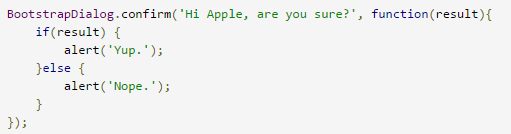
Bootstrap3 Dialog (Git Hub)is a nice clean simple solution that meets all our needs.  The code is well laid out and I was able to make some minor modifications that met our custom needs.